For Australian properties outside the fixed-line and fixed-wireless NBN footprint, Starlink is now the default satellite internet option — broadly 50–250 Mbps down and 20–40 ms latency against Sky Muster’s 25/5 Mbps and 600 ms-plus. The trade-off is cost: $139 AUD per month including GST plus $599 AUD for hardware, against Sky Muster plans that often land under $100. If you already have NBN fibre or a solid fixed-wireless tower, Starlink is the more expensive way to get a slower connection.
By Cate Larkin, regional telecommunications correspondent at Starlink News, who has covered rural broadband policy and satellite rollouts since the first Sky Muster launches. Regulatory and licensing sections reviewed by Grant Cousins, telecommunications policy analyst, with fifteen years working on Australian spectrum and carrier licensing matters. Last updated 19 September 2026 · next scheduled review 19 October 2026. This revision is desk research: Starlink’s published Australian pricing and plan pages, the ASIC, ACMA and TIO registers, nbn’s published Sky Muster material, Ookla’s Australian country data and dated owner reports from outback regions. We are not a Starlink reseller, affiliate or advertising partner and earn no commission on orders. Our sourcing, method and the limits of this analysis are set out in full at the foot of the page.
Starlink Australia: Current Pricing and Plans in AUD
Australian pricing is displayed GST-inclusive, so the number on the order page is the number that hits your card. The residential Standard plan sits at $139 AUD per month including GST, the Priority tier at $174 AUD per month including GST, and the standard hardware kit at $599 AUD as a single up-front purchase. There is no activation or setup fee; shipping adds roughly $50–$100 AUD depending on how far the kit has to travel.
| Item | Price (AUD, GST inc.) | Notes |
|---|---|---|
| Standard plan (residential) | $139 / month | Unlimited standard data; deprioritised behind Priority traffic during cell congestion |
| Priority plan | $174 / month | Prioritised data allocation; business terms; static / public IP available as an add-on |
| Hardware kit | $599 one-off | Dish, Wi-Fi router, cabling, basic ground stand |
| Shipping | $50–$100 | Varies by destination; remote postcodes sit at the top of the range |
| Setup / activation | $0 | No installer fee — self-install only |
Why the price can vary by address
Because Starlink prices and allocates capacity by satellite cell rather than nationally, one price check is not evidence. Starlink has previously offered reduced monthly rates or discounted hardware in low-congestion cells while leaving busy coastal cells at full price, and it periodically runs hardware promotions tied to a minimum service term. That is why you should enter your exact address at the Starlink Australian storefront rather than the nearest town. Two properties 30 km apart can legitimately sit in different cells and see different rates, and the checkout price is the binding one.
Is there GST on Starlink?
Yes. Starlink charges Australian GST and the advertised monthly and hardware figures already include it. Farms, contractors and remote businesses should pull the tax invoice from the account dashboard each month rather than reconstructing the amount, because shipping, hardware and service lines are itemised separately and only the itemised invoice will support an input tax credit claim. Thresholds for writing off the hardware change between financial years — check the position on the ATO website or with a registered tax agent before assuming last year’s treatment still applies.
What separates Standard from Priority?
Standard is a consumer product: one service address, unlimited standard data, and a place at the back of the queue when a satellite cell is busy. Priority buys a prioritised data allocation — useful when a mine camp, agronomy office or remote clinic cannot tolerate a 7pm slowdown — plus business terms and the option of a static or publicly routable IP address for VPNs, remote cameras and on-site servers. In practice a single household almost never needs Priority. A property running SCADA telemetry, a point-of-sale system and twelve staff phones often does, and the $35 monthly difference is trivial against a day of lost trading.
ACMA Licensing and Regulatory Status
Starlink is legal to use in Australia and has been since commercial launch. The service operates under apparatus licensing administered by the Australian Communications and Media Authority (ACMA), with an Australian-registered company as the local supplying entity. The three registers that establish this are public, and the searches below can be reproduced in under ten minutes.
What the public registers show
- Company existence. Searching “Starlink” and “SpaceX” on ASIC’s Registry Search returns an active Australian proprietary company operating as the local Starlink entity, registered under the name Starlink Internet Services Pty Ltd. Read the ACN and the current status straight off the register record: both the registered name field and the status can change, and the ACN is the identifier you would quote in any dispute.
- Spectrum authorisation. A licensee-name search on the ACMA Register of Radiocommunications Licences returns apparatus licence records associated with the Starlink gateway earth stations, with site records, licence types and coordination conditions attached. User terminals operate in Ku-band, gateway links in Ka-band, subject to conditions that protect incumbent satellite and terrestrial services.
- Ombudsman access — check it before you order. The Telecommunications Industry Ombudsman provider search lists the Starlink Australian entity as a scheme member, meaning external complaint escalation is available. Membership lists change; if a silent ticket queue would be intolerable for your clinic or business, run that search yourself before ordering.
- Carrier licence status — we do not assert a conclusion. ACMA publishes who holds a carrier licence and what triggers the requirement on its carrier licences pages. That classification can shift with corporate structure, and a wrong answer here has real consequences for buyers, so we point you at the authoritative list rather than freezing a claim in a page you might read months from now.
Two different licences — and why they get conflated
Coverage of Starlink’s Australian status frequently muddles two separate instruments. Apparatus licences are issued under the Radiocommunications Act 1992 and authorise radio transmission — this is what the dishes and gateways operate under. A carrier licence is a different instrument under the Telecommunications Act 1997, required where an entity owns a “network unit” used to supply carriage services to the public in Australia. Holding the first does not automatically mean holding the second, and some satellite operators supply services through arrangements that sit differently again. Three things hold regardless of that classification:
- Australian Consumer Law applies either way. The consumer guarantees — that a service is fit for purpose, delivered with due care and matches its description — attach to supply to Australian consumers regardless of telecommunications classification. The ACCC’s consumer guarantees guidance sets out what you can demand, and the 30-day return window sits on top of those statutory rights, not instead of them.
- Universal service arrangements do not cover you. The obligations underpinning a guaranteed voice service in remote Australia attach to designated providers, not to satellite broadband bought direct. Do not retire a working voice fallback on the assumption Starlink inherits those duties.
- Your evidence is your leverage. Obstruction reports, dated wired speed tests and the app’s outage log are what turn “it’s slow” into a claim someone has to answer.
Australia’s regulatory position is comparatively simple by global standards: licensing was resolved early and without the landing-rights fights seen elsewhere — see our tracker of Starlink Availability by Country: Current Rollout Status and Expansion Map for where each market sits. The contrast with Europe is instructive: national licensing, gateway placement and sovereignty debates there have produced a far more fragmented picture, covered in Starlink in the European Union: Regulatory Landscape and National Rollouts.
Starlink vs NBN: Speed and Reliability Comparison
Starlink is not really competing with the NBN in general — it is competing with the satellite internet tier of it. Where fibre or a healthy fixed-wireless tower exists, NBN wins on price and usually on speed. Where the only option is nbn’s Sky Muster geostationary service, Starlink wins decisively on latency and comfortably on throughput.
| Metric | NBN Sky Muster | NBN Sky Muster Plus | Starlink Standard |
|---|---|---|---|
| Typical download | ~25 Mbps | ~50 Mbps burst | 50–250 Mbps |
| Typical upload | ~5 Mbps | ~10 Mbps | 10–20 Mbps |
| Latency | 600+ ms | 600+ ms | 20–40 ms |
| Data treatment | Metered plans | Unmetered essentials; shaping after the metered allowance | No hard cap; deprioritisation possible during congestion |
| Orbit | Geostationary (~35,786 km) | Geostationary (~35,786 km) | Low Earth orbit (~550 km) |
| Accountability path | Retailer + industry codes + TIO | Retailer + industry codes + TIO | App/web ticketing; TIO membership listed on the TIO provider search |
Why the latency gap is physics, not marketing
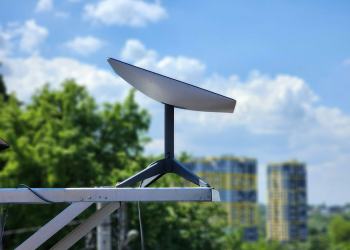
Latency on satellite internet is dominated by orbital altitude. A geostationary satellite sits about 35,786 km above the equator, so a single signal round trip covers roughly 143,000 km and cannot beat about 480 ms even at the speed of light; real Sky Muster round trips land above 600 ms once ground-segment processing is added. Starlink satellites orbit near 550 km, cutting the geometric component to a few milliseconds and the measured total to tens of milliseconds. That is why Sky Muster users describe video calls as “walkie-talkie” conversations while Starlink users treat them as unremarkable. No amount of retail plan engineering changes this — it is a distance problem, and only a lower orbit solves it.
Where NBN still wins
Sky Muster Plus leaves selected traffic — email, web browsing, some updates — unmetered, and its pricing suits low-usage households on a pension or a seasonal budget. NBN also has an accountable retail layer: a named retailer bound by industry codes, with a well-worn ombudsman path if things go wrong. Starlink trades some of that structure for raw performance and self-service support. For a homestead running remote schooling or telehealth, the performance is worth the trade. For a shed used four weekends a year, it usually is not.
Installation and Setup for Rural Properties
Every Australian installation is owner-managed: the kit arrives with dish, router, cabling and a basic ground stand, and no professional visit is required or offered. There is no certified Starlink installer network in Australia as of this review date. The steps below are ordered the way a careful install actually runs, and each maps to a failure mode documented in Starlink’s support material or raised repeatedly in Australian owner forums.
- Run the obstruction check first, from the exact mounting point. The Starlink app uses your phone camera to sweep the sky and flag anything blocking the field of view. Scanning at ground level and then mounting on a roof produces a different result — scan where the dish will live. If you cannot safely stand there, tape the phone to a pole.
- Mind the northern sky. In Australia the satellites the dish tracks most heavily sit to the north, so gum trees, rainwater tanks, silos and machinery sheds on that side matter far more than anything south. A southern windbreak that looks fatal on paper is often irrelevant in practice.
- Plan the cable run before you mount. The supplied cable is generous but finite, and the connector is not field-repairable with a crimp tool. Decide where the router will sit — a house, not an unventilated tin shed — and route the cable with a drip loop so water runs away from the entry point rather than into it.
- Use a proper pole or ridge mount for permanent installs. Starlink sells pole, pivot and ridgeline kits, and Australian third-party mounts are widely available. A dish sitting on the ground stand in a paddock will be moved by cattle, wind or a curious kelpie within a month.
- Check the environmental envelope. Starlink publishes operating temperature ranges per hardware generation; confirm the figure for the kit you are buying. Alpine frost is rarely the problem here — Pilbara and Channel Country summer is. Mount with airflow beneath the dish and keep the router out of dark, sealed enclosures.
- Budget the power. The system draws meaningfully more than a typical NBN modem, which matters on solar and battery systems. Size the array and battery for continuous 24-hour draw, not average use, and test behaviour through your inverter before you rely on it.
- Earth and surge-protect. On a metal-roofed homestead in a lightning belt, a surge diverter on the power side and a properly bonded mount are cheap insurance. This is the one step where a licensed local antenna installer or electrician is usually money well spent — not because Starlink requires it, but because roof work, pole footings and earthing are safety and workmanship decisions.
The failure patterns behind most rural support tickets
Three issues dominate the complaint threads in Australian satellite broadband forums, and all three are install faults rather than service faults. First, a dish mounted under a partial obstruction that only bites during certain orbital passes — the connection looks fine for an hour and then drops repeatedly at the same times of day. Second, a router buried in a steel shed, so Wi-Fi never reaches the house and the satellite link gets blamed for a radio problem 40 metres away. Third, dust and water ingress at an unsealed cable entry, which shows up weeks later as intermittent faults.
Give the dish 12–24 hours to map the sky and re-check the obstruction report before concluding the service is underperforming; the first-hour numbers are not representative of steady-state behaviour. The satellite broadband sections of Whirlpool’s forums carry long-running Australian Starlink threads with dates, postcodes and screenshots, which you can filter to your own region and hardware generation.
Real-World Performance: What Australian Owners Report
Dated owner posts from outback regions report throughput and latency figures alongside the time of day people tested. The pattern is consistent enough to be useful as a plausibility check on a sales pitch.
| Region | Evening peak (7–10pm) | Off-peak | Reported latency |
|---|---|---|---|
| Alice Springs, NT | 80–140 Mbps | 160–240 Mbps | 25–40 ms |
| Katherine, NT | 90–150 Mbps | 150–230 Mbps | 25–45 ms |
| Longreach, QLD | 85–150 Mbps | 170–250 Mbps | 20–38 ms |
| Birdsville, QLD | 100–160 Mbps | 180–250 Mbps | 22–40 ms |
One disclosure that governs this whole section: these are self-reported owner figures, not measurements taken by Starlink News. We have not benchmarked individual sites, we cannot verify anyone’s test methodology, and self-reported results skew toward the delighted and the furious. Reported uploads across these regions cluster at 10–20 Mbps. For method-controlled national context, Ookla publishes median fixed-broadband figures for Australia on the Speedtest Global Index country page.
The structural point behind the numbers: throughput varies with how many active users share your satellite cell, not with your distance from a town. A property 400 km from anywhere often outperforms a semi-rural block on a popular coastal fringe, because the outback cell is nearly empty and the coastal one is not.
How to run a test that actually means something
Speed claims are only useful with a method attached. A credible rural test: run from a device wired to the Starlink router, not over Wi-Fi at the far end of a homestead; repeat at midday, between 7pm and 9pm, and after midnight; record the date, postcode, hardware generation and whether other devices were active; and keep results in one file so you have evidence if you later raise a ticket. Wi-Fi — not the satellite link — explains a large share of “slow Starlink” reports on properties with thick walls, steel cladding and long internal runs.
Weather, wet season and dust
Heavy tropical rain causes rain fade: short throughput drops during the most intense cells of a Top End wet-season storm. Owner reports through recent wet seasons consistently describe degradation measured in minutes rather than days, and nothing like the multi-hour outages that recur in Sky Muster discussions — though both services degrade in the same storms and neither is immune. Red dust is cosmetic more than performance-affecting; an occasional wipe-down and a mount angled to shed water handle it. Snow and ice modes exist on the hardware but are largely irrelevant outside alpine Australia.
Bushfire, cyclone and outage resilience
Because the link is satellite-based, Starlink does not depend on the terrestrial backhaul, copper and mobile towers that fail first in a fire, cyclone or flood. A property with the dish intact and battery or generator power can keep communications running while the surrounding network is down — a pattern consistent with the service’s documented behaviour in overseas emergencies, covered in Starlink in Disaster Relief: Hurricane and Conflict Zone Connectivity.
The practical lesson is narrower than the marketing: the failure mode in a fire is almost always local power loss or heat damage, not the satellite link. Keep a DC power path or generator, a spare cable, and — critically — a voice fallback that does not depend on the internet connection.
Enterprise and carrier uptake: what is on the public record
Rather than gesturing at unnamed “major miners”, here are checkable examples. Both Telstra and Optus have publicly announced partnerships with SpaceX to bring Starlink-based services to Australian customers — Telstra announcing satellite broadband for regional home and business customers, Optus announcing direct-to-handset satellite messaging built on Starlink’s direct-to-cell capability. Both are documented in the carriers’ own media releases, which is where to verify current product scope, because announced dates and included features have shifted more than once. On the resources and agriculture side, low Earth orbit connectivity for camp welfare, telemetry and site communications has moved from trial to procurement at multiple Australian operations, but the specifics are commercial-in-confidence: treat any individual corporate deployment as announced rather than audited unless you can find the operator’s own statement.
Who Starlink Suits — and Who Should Wait
Strong fit
- Properties with no fixed-line NBN and no reliable fixed-wireless tower — the clearest case, where the realistic alternative is Sky Muster.
- Households doing remote schooling, telehealth or video-heavy work from a homestead, where 600 ms latency is the daily constraint.
- Farms and stations running cameras, moisture probes, tank telemetry or cloud accounting that a geostationary link makes painful.
- Seasonal or camp-based operations that can use monthly pausing to match billing to occupancy.
- Businesses needing a static or publicly routable IP for VPN access to on-site systems (Priority tier).
Wait, or choose something else
- Addresses with NBN fibre to the premises or node — you would pay more for less speed.
- Blocks with a strong, evening-tested 5G fixed-wireless signal, usually cheaper and lower-latency again.
- Low-usage households where Sky Muster Plus already covers browsing and email within budget.
- Sites with unavoidable obstruction — dense canopy or a steep ridge to the north — where no mounting point clears the sky.
- Anyone who needs a contractual fault-response commitment more than they need throughput.
Should you keep NBN as backup?
For anything safety-critical — a remote clinic, a station with an airstrip, a business taking card payments — a hybrid setup is the sensible configuration: Starlink as the primary link, a retained Sky Muster or mobile broadband service as failover, joined by a dual-WAN router that switches automatically. The second service typically costs around a third of the primary but removes a single point of failure and, running on different technology through a different provider, is unlikely to fail in the same event. Households can get most of that resilience with a mobile hotspot, a charged power bank and a one-page failover plan written down where everyone can find it.
Indigenous and community access
Satellite connectivity in remote communities is more often funded than bought retail. The federal Regional Connectivity Program, administered by the Department of Infrastructure, Transport, Regional Development, Communications and the Arts, funds place-based connectivity projects in regional and remote Australia and sits alongside the Mobile Black Spot Program. Community organisations and councils should approach upgrades through those channels — where hardware and ongoing service costs are sometimes covered, and where round timing and eligibility criteria are published — rather than through individual retail orders. The underlying economics of low-income, high-remoteness markets are the same question playing out globally; a useful comparison is the pricing and partnership debate examined in Starlink in India: Regulatory Hurdles, Partnerships, and Market Potential, where affordability, not coverage, is the binding constraint.
Ordering, Lead Times, and Support in Australia
Orders are placed directly at Starlink’s Australian storefront, where Starlink availability is assessed cell by cell against the coordinates of the address you enter. Hardware ships from Australian distribution points, and reported delivery times cluster at 1–2 weeks to metropolitan and large regional addresses and 2–4 weeks to genuinely remote locations, with the final leg — regional depot to station homestead — accounting for most of the variance. These are owner-reported ranges, not a published service level. In the wet season, road closures in the Kimberley, Top End and Channel Country add time no courier can recover; if you need connectivity by a fixed date, order a month early.
What support actually looks like
Support is ticket-based through the Starlink app and web account. There is no Australian phone line. Well-documented tickets typically draw a response within a day or two; vague tickets move slowly. Before raising one, capture three things: the obstruction report, a screenshot of the app’s statistics page showing outage causes and durations, and speed tests from a wired connection at two different times of day. Tickets containing that evidence resolve far faster than “it’s slow”, and the same evidence is what you would need to escalate under the consumer guarantees or to the ombudsman.
Pausing, returning and changing plans
- 30-day trial: hardware can be returned within the published trial window if the service does not perform at your address. Keep the original packaging — returns ship back, and damaged kit reduces what you recover.
- Monthly pause: billing stops while you keep the kit — well suited to seasonal properties, shearing sheds and fly-in operations. Confirm how pausing interacts with your service address before pausing for long periods.
- Plan changes: moving between Standard and Priority is handled in the dashboard and takes effect on the billing cycle, so test whether congestion is genuinely your problem before paying to upgrade.
- Address changes: update the service address when the dish moves permanently; capacity and pricing are tied to the cell your address sits in, not to the hardware.
For Australians who tow the dish rather than bolt it down, the Roam-style mobile plans are a separate product family with different pricing, portability rules and performance expectations — the trade-offs are set out in Starlink for Digital Nomads: Portable Internet Across Borders.
The Bottom Line for Rural Australia in 2026
Starlink has turned satellite internet in Australia from a compromise into an ordinary broadband experience for properties the fixed-line network will never reach. At $139 AUD a month including GST plus $599 AUD in hardware, it costs more than Sky Muster and delivers roughly five to ten times the throughput at a fraction of the latency. The honest qualifiers: you install it yourself, you support it through an app, and performance depends on a satellite cell you share with everyone else nearby. Verify your own address at checkout, confirm ombudsman membership on the day you order, and keep a voice fallback that does not run over the internet. For a homestead, a station, a remote clinic or a contractor’s camp, that still leaves it the strongest connectivity option available in the country.
Sourcing, Method and Update Policy
What we check, and when
This page is on a monthly review cycle. At each review we re-check: (1) plan and hardware pricing published at the Starlink Australian storefront, noting that cell-based pricing makes any single national figure unrepresentative; (2) plan structure and add-on availability; (3) entity, licence and ombudsman-membership records on the ASIC, ACMA and TIO registers linked above; (4) nbn’s published Sky Muster positioning and satellite roadmap announcements; and (5) current national median broadband figures on Ookla’s Australian country page. Out-of-cycle updates are triggered by a price change, a plan or policy change, a regulatory announcement affecting Australian licensing, or a reader correction we can verify against a primary source.
Changelog
- 19 September 2026 — Full review. Named author and reviewer added with linked bios. Regulatory section rewritten against the published ASIC, ACMA and TIO registers rather than only describing how to search them, and the carrier-licence claim left explicitly open rather than asserted. Owner-reported performance figures restructured into a regional table with a single method disclosure. Duplicate caveats removed and FAQ answers shortened. Changelog entries begin from this revision; earlier versions were not formally logged.
- Next scheduled review: 19 October 2026.
Limits of this analysis
We have not conducted independent field measurements at any Australian site; the speed and latency bands here are compiled from publicly posted owner reports and are indicative only. We do not have access to Starlink’s cell-level capacity data, so we cannot tell you what your specific address will deliver. The regulatory detail here follows the public registers linked above, which can change without notice. Tax commentary is general information, not tax advice. Pricing is volatile and address-specific: the figure at your checkout prevails over any figure published here.
Disclosure and corrections
Starlink News is independent. We are not a Starlink reseller, affiliate or advertising partner, and no payment or hardware was received in connection with this article. If you find an error — particularly in the pricing table or the regulatory section — send the primary source to our editors and we will correct the page and log the change with an effective date.
Primary sources cited
- ACMA Register of Radiocommunications Licences and ACMA carrier licensing information
- ASIC Registry Search (company registration and status)
- Telecommunications Act 1997 (Federal Register of Legislation)
- ACCC consumer guarantees guidance and the Telecommunications Industry Ombudsman member search
- nbn co — Sky Muster explained
- Ookla Speedtest Global Index — Australia
- Starlink Australia storefront and specifications
- Regional Connectivity Program, Department of Infrastructure, Transport, Regional Development, Communications and the Arts
- Whirlpool forums — dated Australian owner reports (indicative, self-reported)
Frequently Asked Questions
What does Starlink actually cost in the first year in Australia?
Budget roughly $2,270 AUD for year one on the Standard plan: $599 hardware, $50–$100 shipping, and twelve months at $139 (about $1,668) — all GST-inclusive, with no activation fee. Add $100–$400 for a pole or ridge mount, surge protection and a licensed tradesperson if the dish goes on a roof. Choosing Priority instead lifts the service component to about $2,088. Year two costs the service alone, and pausing months when nobody is on the property is the main lever for seasonal operations.
How much power does Starlink use, and will it run off-grid on solar?
Yes, but it has to be designed in, not bolted on. Owner measurements at the plug typically show 40–60 W continuous for current Standard hardware, with peaks above 100 W during boot-up and heat management cycles. At 50 W you are drawing about 1.2 kWh a day — roughly 100 Ah at 12 V before inverter losses. Size the array and battery for continuous 24-hour draw rather than average use, run it through a pure sine wave inverter or a DC conversion kit, and test the chain through a cloudy week. A timer can recover a third of the daily load.
Can I claim Starlink as a business or farm expense in Australia?
Generally yes, to the extent the service relates to producing assessable income, with private use apportioned out; GST-registered businesses can usually claim input tax credits on the business portion. Documentation decides it: download the monthly tax invoice from the Starlink dashboard (hardware, shipping and service are itemised separately), record a defensible business-use percentage, and treat the hardware under the capital allowance or write-off rules current in that financial year. Confirm thresholds with the ATO or a registered tax agent — this is general information, not tax advice.
Does Starlink support emergency 000 calls like a landline?
No. Starlink supplies an internet connection only; any voice service you run over it is third-party VoIP, carrying none of the regulated emergency-call obligations, address registration or priority handling attached to a fixed line or mobile service. If power fails, a storm cell blocks the dish, or the network drops, the handset is dead. Remote properties should keep a mobile on the best available carrier, plus a satellite phone or UHF/HF radio path, and a registered distress beacon where the property is genuinely isolated. Write the fallback down.
How does Starlink compare with 5G or 4G fixed wireless on a rural property?
Where a mobile tower genuinely reaches you with a stable signal, fixed wireless usually wins on price and latency, commonly under 30 ms. The catch is ‘stable’: many rural blocks sit at the ragged edge of a cell, fast at 6am and unusable at 7pm, with no redundancy when the tower fails. Borrow or buy a modem with an external antenna and log speeds hourly for a fortnight, evenings included, before committing. If evening throughput collapses or the signal moves with weather and foliage, Starlink is the more predictable option.
How do I check whether my address has Starlink capacity or is waitlisted?
Enter the full service address — not the nearest town — on Starlink’s Australian order page. Starlink availability is assessed per satellite cell, so the check returns immediate availability, a waitlist, or a capacity-constrained message for your coordinates specifically: a homestead can be waitlisted while a town 40 km away is open. Waitlists move as satellites and ground stations come online, subscribers churn or pause, and cells are redrawn, so re-check monthly. Avoid second-hand kit registered to another address; activation still follows the capacity check.
Is nbn retiring Sky Muster, and should I wait for its replacement?
nbn co has publicly signalled it intends to move regional satellite customers to a low Earth orbit service, which would close most of the gap that makes Starlink compelling today. Infrastructure timelines routinely slip, and until a replacement actually reaches your address you live with geostationary latency above 600 ms. The sensible reading: if your household copes on Sky Muster and money is tight, waiting is defensible; if remote schooling, telehealth or a business depends on the link, it is not. Check nbn’s own announcements for the current position.


![How Satellite Internet Works: LEO vs GEO Explained [2026]](https://starlink-news.com/wp-content/uploads/2026/09/how-satellite-internet-works-leo-vs-geo-explained-12cf2847-350x250.png)




![Using Your Own Router with Starlink: Bypass Mode [2026]](https://starlink-news.com/wp-content/uploads/2026/09/using-your-own-router-with-starlink-bypass-mode-20-f6c09f95-120x86.png)



Comments 2