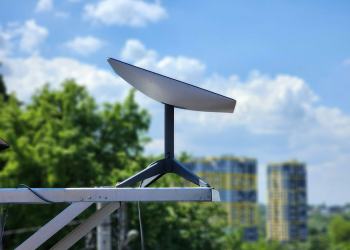
The Starlink Mini is SpaceX’s portable satellite internet terminal: 1.1 kg, 29.8 × 26.4 × 3.8 cm, an integrated WiFi router, and an officially published power draw of 20–40W that owners with inline meters routinely report running at the lower end in steady state. Most real-world sessions land somewhere between 80 and 150 Mbps down. At the last check of the US store on 19 September 2026 the kit was listed at $299. If you need satellite internet that fits in a daypack and runs from a 12V battery without an inverter, it is the only Starlink terminal that qualifies.
This page is a working reference rather than a launch review, and it is written to be checkable. Every class of figure below is labelled with where it comes from, and the power and speed sections include the steps to reproduce the measurements yourself rather than asking you to take a number on trust.
Where These Numbers Come From
One methodology statement, stated once, that applies to everything after it:
- Specifications — dimensions, weight, IP rating, input voltage range, operating temperature — are taken from Starlink’s published specification and support pages. These are unambiguous.
- Power and speed figures are aggregated from publicly posted owner measurements in the r/Starlink subreddit and Starlink’s community forum, cross-referenced against Ookla’s published country-level Starlink medians and against hands-on reviews from independent hardware outlets. This is crowd-sourced data from self-selected reporters using consumer meters, so it establishes a realistic envelope, not a laboratory value. Bands are given deliberately wide, and no claim on this page rests on a single reported reading.
- Pricing and availability are read directly from starlink.com, with the verification date stated in each section. SpaceX changes prices without notice and geolocates its store pages.
- Regulatory status is checked against the relevant national regulator’s own database rather than press coverage.
Where a figure cannot be pinned down — firmware-by-firmware power changes being the clearest example — that is said in the sentence, once, rather than repeated as a disclaimer in every section.
What Is the Starlink Mini?
Starlink Mini is a flat-panel phased-array satellite internet terminal with the modem, router and antenna combined in a single 1.1 kg enclosure. It launched in June 2024, initially in the United States and a small set of Roam markets, as the first Starlink hardware designed to be carried rather than installed.
Its position in the lineup is simple. The Standard Rectangular dish is the fixed-site workhorse at 2.9 kg with a separate router. The Mini trades antenna area and peak throughput for portability, a much lower power budget, and a setup that takes seconds instead of an afternoon on a ladder.
Three design decisions define the product:
- Integrated router. WiFi 5 on 2.4 and 5 GHz is built into the panel, so there is no second box, no second power supply and no router cable. Starlink rates the kit’s own coverage at roughly 112 m² (1,200 ft²) — a single-storey cabin, not a family house.
- IP67 ingress rating against IP54 for the Standard dish. The Mini is rated for temporary immersion; the Standard for splash and dust. That matters for a terminal that lives on beaches, boat decks and roof racks.
- Kickstand instead of a mount. The stand folds out of the chassis, so there is no separate base to lose at a campsite at dusk.
Critically, the Mini uses the same constellation, the same ground stations and the same consumer service plans as every other terminal. Nothing about the service changes — only the size of the aperture pointed at it, and every trade-off below follows from that.
Dimensions, Weight and Physical Design
The panel measures 29.8 × 26.4 × 3.8 cm (11.7 × 10.4 × 1.5 in) and weighs 1.1 kg including the kickstand — a slightly smaller footprint than a 13-inch laptop and roughly three times as thick. It slides into the laptop sleeve of any 25L daypack.
The practical packing constraint is not the panel but the 15 m integrated cable, which is permanently attached and does not detach. Coiled, it occupies about the volume of a one-litre bottle and adds real weight to a bag already carrying a laptop. A hook-and-loop cable wrap is the first accessory worth buying.
| Attribute | Starlink Mini | Standard Rectangular |
|---|---|---|
| Dimensions | 29.8 × 26.4 × 3.8 cm | 51.3 × 30.3 × 3.9 cm (approx.) |
| Weight | 1.1 kg | 2.9 kg |
| Cable | 15 m, fixed, non-detachable | 15 m detachable, extendable to 45 m |
| Ethernet | None without USB-C adapter | Via Ethernet adapter accessory |
| Mount | Integrated kickstand | Separate base or pole mount |
| Ingress rating | IP67 | IP54 |
| Typical power draw | 20–40W official; reports cluster lower | 50–100W typical |
The absence of a native ethernet port surprises most buyers. Wired connections require the USB-C to Ethernet adapter sold separately, and that adapter occupies the same USB-C port some owners want for power — you cannot run USB-C power and wired ethernet from that single port simultaneously. On a boat or in a cabin this pushes you toward the 12V barrel input for power and the USB-C port for ethernet. Plan the cabling before committing to a semi-permanent install.
The rear mounting thread accepts common 1/4-inch and M8 hardware depending on the adapter, and the third-party ecosystem of pole clamps, rail mounts, magnetic roof plates and ball heads is now considerably broader than Starlink’s own accessory range.
Starlink Mini Power Consumption: Watts, Volts and Runtime
Power is why most buyers choose the Mini over the Standard dish, so this is the reference section for every wattage quoted elsewhere on the page.
The figures that matter
- Official typical draw: 20–40W, published by Starlink.
- Reported steady state: owner meter readings cluster in the high teens to low twenties of watts on recent firmware. Treat 15–25W as the honest real-world envelope, with genuine variance between units, ambient temperatures and traffic loads.
- Idle / low activity: around 15W with the terminal connected but passing little traffic. That is far above the ~5W figure repeated in some early write-ups, and it is the single most common reason people under-size a battery bank. There is no meaningful sleep state.
- Peak: up to roughly 60W during boot and first satellite acquisition, lasting seconds. Your power source must survive the spike even though it barely affects daily energy totals.
- Standard dish, for comparison: 50–100W typical — two to five times the Mini.
The gap between Starlink’s 20–40W and what people measure is not an error on either side. The official range has to cover worst-case traffic, cold-weather heater activity and every firmware version in the field; the lower reported figures reflect warm, lightly loaded terminals on current software. Owners widely report that consumption improved across firmware releases, but SpaceX does not publish release notes for consumer terminals, so any precise claim that a given update cut draw by a given percentage is inference rather than fact.
Planning figure: 20W. It sits inside the official range, near the top of the reported band, and leaves headroom for a cold night.
How to measure your own draw in five minutes
Rather than trusting anyone’s published band, measure the terminal you actually own. Both paths are cheap to instrument:
- USB-C path: put an inline USB-C PD meter between the source and the terminal. Note the reading at boot (expect a brief climb toward 60W), then at five minutes idle, then during a sustained speed test.
- 12V path: use a shunt-based battery monitor or a clamp meter on the positive lead and multiply amps by measured battery voltage. A 20W load at 12.8V reads about 1.6A.
- Whole-system check: leave the terminal connected but unused overnight on a known battery capacity and compare state of charge at both ends. That single number — overnight watt-hours consumed — is more useful for sizing than any instantaneous reading, because it captures heater cycles you would otherwise miss.
Log the three readings and you have a figure specific to your firmware, climate and traffic profile, which beats any generalised band including this one.
12V DC versus USB-C Power Delivery
The Mini accepts 12–48V DC through a 5.5 × 2.1 mm barrel connector, or USB-C Power Delivery at 100W minimum. These are not equivalent in practice:
- 12V DC is the reliable path. Wiring straight to a 12V lithium or AGM battery skips inverter losses entirely and removes the negotiation layer responsible for most power complaints. It is the configuration vanlife and marine owners converge on.
- USB-C PD is the fragile path. The terminal wants a genuine 100W PD 3.0 profile from a single port. Reports are consistent on two failure modes: 65W-class chargers and banks that refuse to negotiate or brown out during the acquisition spike, and banks advertised at 100W that boot the terminal but cannot hold the profile under load. Cabling matters as much as the source — a 5A e-marked cable is mandatory, and a generic 3A cable is the usual silent cause of a brand-new power bank not working.
Battery and solar runtime maths
The table below is arithmetic, not a measured discharge test. It assumes the 20W and 25W planning figures, 80% depth of discharge on LiFePO4, and a 10–15% loss where energy passes through an inverter to an AC socket. Substitute your own measured draw from the section above and the results shift accordingly.
| Power source | Usable energy | Runtime at 20W | Runtime at 25W |
|---|---|---|---|
| 250Wh power station (AC out) | ~210Wh after losses | ~10 hours | ~8 hours |
| 500Wh power station (AC out) | ~425Wh after losses | ~21 hours | ~17 hours |
| 500Wh station via 12V DC out | ~475Wh | ~23 hours | ~19 hours |
| 100Ah 12V LiFePO4 (80% DoD) | ~1,020Wh | ~50 hours | ~40 hours |
Two practical notes carry more value than the table. First, always take the 12V DC output on a power station rather than its AC socket where one exists: you recover 10–15% of stored energy immediately, which is often the difference between one night and two. Second, a 100W solar panel in reasonable sun produces roughly 400–500Wh per day, comfortably covering 24-hour Mini operation with margin for a cloudy morning. One 100W panel runs one Mini indefinitely at most latitudes — the most useful relationship on this page for off-grid planning.
Real-World Satellite Internet Speeds: Mini vs Standard Dish
Both terminals share the same theoretical ceiling of roughly 250 Mbps down and 25 Mbps up. Nobody lives at the ceiling.
Across owner-posted speed tests, Ookla’s published Starlink country medians and independent 2026 hands-on reviews, the Mini’s realistic band lands around 80–150 Mbps down and 10–20 Mbps up, with a central tendency near 120 Mbps. Individual sessions range from roughly 50 Mbps in congested cells at peak evening hours to 200 Mbps or better in quiet ones, and cell congestion explains more of that spread than the hardware does. The convergence between crowd-sourced screenshots and reviewer testing is the reason the band is quotable at all; the width of the band is the honest part.
Where the Mini gives ground
- Latency: 40–60ms typical against 30–50ms for the Standard dish. The smaller phased array has fewer elements and re-steers with marginally less agility during satellite handoffs. Competitive gamers notice; video callers do not.
- Rain fade: the Mini’s 0.34 m² aperture collects less signal than the Standard’s 0.49 m². In heavy tropical downpours it degrades earlier and recovers slightly later. In light rain the difference is negligible.
- Congestion behaviour: in dense cells at peak hours the Mini’s lower link margin shows up as deeper troughs rather than a lower average. Your median looks fine; your worst five minutes are worse.
Where the two are identical
Obstruction sensitivity. Both terminals need roughly a 100° cone of clear sky, and both suffer identically from one badly placed branch. A smaller panel is not a more tolerant one — a persistent and expensive misconception. Run the obstruction scanner in the Starlink app before mounting anything permanently, and run it again in a different season if the trees around you have leaves.
Starlink Price in 2026: Hardware and Plans
Starlink price checked on the US store, last verified 19 September 2026.
The Mini kit was listed at $299, well below the $599 it launched at in 2024, with European and UK storefronts priced separately according to local tax treatment. SpaceX adjusts hardware pricing without announcement, runs periodic regional promotions and geolocates its shop pages, so the Starlink price you see depends on where you are browsing from. Check starlink.com for your own country before budgeting, and follow our running Starlink price coverage for changes between updates to this page.
The moving target has a clear implication: whenever the Standard dish is discounted below the Mini — which happens regularly — a fixed home installation should buy the Standard. The Mini’s premium, when it exists, buys portability and a lower power budget, nothing more.
Service tiers
There is no Mini-specific tier. The terminal registers its hardware type on activation and inherits whatever plan the account holds.
- Compatible: Residential, Roam Regional, Roam Global and the Boat (Mini) plan.
- Not compatible: Business, Aviation, non-Mini Maritime and fixed-location priority tiers.
Monthly plan pricing varies by market and changes more often than hardware pricing does, so we quote it per-country in our plan coverage rather than here.
Residential versus Roam
Residential is cheaper and grants network priority at a registered service address, but it is not designed for constant relocation and will eventually prompt an address update. Roam Regional covers movement within a continent; Roam Global covers crossing between them and is the only sensible choice for frequent inter-regional travel. Roam plans can be paused between trips, which changes the effective annual cost considerably for seasonal users — a mechanic walked through step by step in our service-flexibility guide to weekly plans and Roam options.
Starlink Availability in 2026: Countries, Shipping and Regulation
Starlink availability checked against the official store and the regulators listed below, last verified 19 September 2026.
The Mini is sold directly from starlink.com in more than sixty markets. There is no authorised retail distribution channel — third-party marketplace listings are resales, and units bought that way can arrive locked to another account’s region or without transferable warranty.
Starlink availability is not the same thing as permission to transmit. Each country licenses the frequencies separately, and a terminal that is legal at home can be unlicensed the moment it crosses a border. Verify against the national regulator before travelling, and watch our Starlink availability tracker for market-by-market changes:
| Market | Status | Authority to check |
|---|---|---|
| United States | Authorised; equipment on file | FCC Equipment Authorization Database (search SpaceX’s grantee code for the current Mini record) |
| European Union | CE marked; member-state frequency licensing varies | European Commission NANDO database; ANFR (France), BNetzA (Germany) |
| United Kingdom | Covered under existing Starlink authorisation | Ofcom |
| Australia | Operates under a radiocommunications class licence | ACMA |
| Brazil | Homologated | Anatel |
| India | Consumer terminal rollout still constrained; import restrictions apply | Department of Telecommunications (DoT) |
Two cautions. No specific FCC ID is reproduced here because forum-copied identifiers are frequently stale, and searching the FCC database directly for SpaceX’s filings takes thirty seconds and is always current. And the CE mark is what European buyers most often misread: it covers product conformity for sale within the EU and does not by itself grant the right to transmit on a given frequency in every member state. Spot-checking a national regulator before a long stay is a ten-minute job that avoids a confiscated terminal.
Best Use Cases: Who Should Buy the Mini
RV, vanlife and marine
The segment the hardware was built for. A sub-25W steady draw is small enough that a modest house battery bank runs it continuously without an inverter, the panel stows flat in a cupboard, and IP67 tolerates weather that would worry a Standard dish. On boats, the Boat (Mini) plan makes coastal connectivity affordable for vessels that could never justify a full Maritime terminal.
Digital nomads
Portugal, Spain, Mexico and Thailand all have working service and visible nomad communities using Mini terminals as a hedge against unreliable apartment broadband. Two checks before flying: that the terminal is regulatorily approved at the destination, and that your plan covers the region. Roam Global plus an approved market is the combination that works; anything else risks a 1.1 kg paperweight.
Emergency and backup connectivity
For a 4–8 hour grid outage, a Mini plus a 500Wh power station is a complete solution with hours to spare, deployable in minutes rather than requiring a roof installation. The same properties make it valuable in disaster response, where terminals must be carried, powered from vehicles and set up without tools — a pattern documented at scale in Starlink in Disaster Relief: Hurricane and Conflict Zone Connectivity.
Remote rentals and small off-grid sites
Hosts with cabins beyond fibre reach use the Mini as guest WiFi. The integrated router covers a single-storey cabin adequately, and the low draw suits solar-fed properties where a Standard dish would dominate the energy budget. Beyond roughly 112 m², plan on a third-party access point from the start.
Who should not buy it
- Permanent home installations. The non-detachable 15 m cable and missing ethernet port make clean cable runs awkward, and the Standard dish is frequently cheaper on promotion.
- Heavy streaming households. Several simultaneous 4K streams plus uploads will find the Mini’s ceiling well before the Standard’s.
- Severe-weather locations. The smaller aperture means earlier rain fade in monsoon and tropical-storm climates.
Limitations and Trade-Offs
- No native ethernet. Wired devices need the USB-C to Ethernet adapter, which rules out using that port for power at the same time.
- The 15 m cable is fixed. It cannot be replaced, shortened or extended. The Standard reaches 45 m with an extension kit; the Mini does not extend at all. Damage to the cable is damage to the terminal.
- Price versus a discounted Standard. Depending on the promotion in your market, the Mini can cost more than a Standard dish.
- No mesh node support. The integrated router does not accept Starlink mesh nodes; coverage beyond ~112 m² needs a third-party access point behind the USB-C ethernet adapter.
- Manual aiming only. No motorised repositioning. You aim once and the phased array steers electronically — fine stationary, not equivalent to a purpose-built in-motion terminal.
- Thermal behaviour. Rated -30°C to 50°C like the Standard, but the smaller thermal mass heats faster in direct sun. Owners in desert conditions report afternoon throttling on terminals mounted flat against dark surfaces; shade or tilt the mount and the problem largely disappears.
- No true idle state. A connected Mini draws around 15W whether or not anyone is using it. Off-grid, that is the number that empties a battery overnight.
Setup and Activation, Step by Step
With clear sky, under ten minutes end to end.
- Install the Starlink app (iOS 14 or later, Android 10 or later) and sign into an account with active service.
- Run the obstruction check before committing to a position. The augmented-reality scan takes about two minutes and saves hours of troubleshooting.
- Place the terminal on its kickstand, level, facing the clearest sky. The Mini finds its beam orientation electronically; you are only responsible for an unobstructed view.
- Connect power. 12V DC barrel for battery and solar, or a genuine 100W PD 3.0 source with a 5A e-marked cable for USB-C.
- Wait for satellite lock. Two to five minutes in open sky, up to fifteen with partial obstructions. First boots after long storage take longer while the terminal downloads fresh ephemeris data.
- Connect to the WiFi network printed on the terminal, then set your own SSID and password in the app.
The terminal auto-recognises its hardware type, so there is no manual plan selection step. Switching terminals on one account — swapping a Standard for a Mini — requires contacting Starlink support to update the hardware ID on the subscription, and owners commonly report about a day of interruption while the change propagates. Firmware updates arrive automatically over the satellite link at a few hundred megabytes per release, count against a metered Roam allocation, and reboot the terminal for a minute or two.
The Verdict: Mini or Standard?
Buy the Mini if the terminal will move — vehicle, boat, backpack, emergency kit — or if your power budget is measured in watt-hours rather than kilowatt-hours. At roughly 20W steady state and 1.1 kg, nothing else in the range competes for that job, and the hardware price cuts since launch have removed the main objection that existed in 2024.
Buy the Standard dish if the terminal will be bolted to a roof and never touched again. The detachable, extendable cable, the larger aperture, the better congestion behaviour and the frequent promotional pricing make it the stronger fixed-site product, and the extra 30–60W is irrelevant on grid power.
The question is genuinely that binary. If you are weighing other terminals in the range, our satellite internet hardware archive covers them the same way.
Update Notes and Sourcing
What changed in this update: power and speed figures are now presented as provenance-labelled envelopes drawn from aggregated public measurements and independent reviews, replacing narrower bands that implied laboratory rigour, and a reproducible measurement procedure has been added so readers can derive their own figures. The runtime table is explicitly labelled as arithmetic from stated assumptions rather than a measured discharge test. Starlink price and Starlink availability sections now carry a verification date. The previously quoted FCC identifier has been replaced with a pointer to the live FCC database.
Sources: Starlink official specification and support documentation; the FCC Equipment Authorization Database; the European Commission NANDO database and national regulator filings (Ofcom, ACMA, Anatel, ANFR, BNetzA, DoT); Ookla published Starlink country medians; independent 2026 hardware reviews; and owner-reported power and speed measurements posted publicly in the r/Starlink subreddit and Starlink’s community forum.
Corrections: if a figure here conflicts with your own meter reading or your own store page, tell us. Reader measurements are how this page stays accurate between scheduled reviews, and readings submitted with the meter type, firmware version and ambient temperature carry the most weight.
Frequently Asked Questions
How much electricity does Starlink Mini use per month, and what does that cost?
At a 20W planning figure running continuously, the Mini consumes about 0.48 kWh per day, or roughly 14.4 kWh per month. At a typical US residential rate near $0.17/kWh that is about $2.45 a month; at a European rate near €0.28/kWh it is closer to €4. Even at the top of the official 40W range you are looking at under $5 a month on grid power. The number only becomes decision-shaping off-grid, where 14.4 kWh a month is the difference between a 100W solar panel being enough and needing two.
What fuse and wire gauge should I use when hard-wiring the Mini to a 12V battery?
At 12V a 20–25W load draws under 2.5A, but the boot spike toward 60W pushes momentary current to roughly 5A, and voltage sag over a long thin run can drop the terminal below its input threshold mid-acquisition. A 7.5A or 10A inline fuse close to the battery positive terminal is the common choice, with 14 AWG for runs up to about 3 m and 12 AWG beyond that. Use a barrel plug with a soldered or crimped joint rather than a screw-terminal adapter, which is the connection most likely to work loose on a moving vehicle.
How many devices and what kind of household can the Mini actually support?
The constraint is rarely raw bandwidth, it is contention. Two or three people browsing, calling and streaming 1080p sit comfortably inside a typical Mini session. The pressure points are simultaneous 4K streams, large cloud backups running in the background during peak evening hours, and any latency-sensitive gaming while someone else is uploading. The Mini’s integrated WiFi 5 router also becomes the bottleneck before the satellite link does in a house with thick walls — put a third-party access point behind the USB-C ethernet adapter before you blame the dish.
How do I tell from a spec sheet whether a power bank will actually run the Mini?
Look for a fixed 20V/5A (100W) PDO listed on a single port, not a combined multi-port total and not a PPS-only profile. Banks that advertise 100W as a sum across three ports will typically negotiate 65W or less to the Mini. The cable matters equally: a 5A e-marked USB-C cable carries an internal chip declaring its rating, and a generic 3A cable will silently cap negotiation regardless of what the bank can supply. If a source boots the terminal but drops it during the acquisition spike, the cable is the first thing to swap.
What happens if I travel with a Residential plan instead of Roam?
Residential grants network priority at one registered service address. Taken away from that address, the account is deprioritised behind local subscribers and will eventually prompt you to update the service address, and repeated relocation without doing so can interrupt service. Roam Regional covers movement within a continent, Roam Global covers crossing between them. The feature seasonal users underuse is pausing: a Roam plan can be paused between trips and resumed, which changes the effective annual cost substantially for anyone who travels three months a year rather than twelve.
What should I check before flying with a Starlink Mini?
Three things, in order. Confirm the destination is a market where Starlink is licensed to transmit, not merely one where the hardware can be sold. Confirm your plan tier covers that region, since Roam Regional stops at continental boundaries. Then check the lithium and radio-transmitter rules of your airline, because the terminal itself contains no battery but the power bank you pair with it is capacity-limited in the cabin and prohibited in the hold. Carry the terminal as hand luggage where possible; the fixed 15 m cable is the part most likely to be damaged by baggage handling.
What does a Starlink Mini actually cost over the first twelve months?
Budget hardware plus twelve months of service plus two accessories almost everyone ends up buying. The kit price is the smallest component over a year for most plans, which is why a hardware promotion should not drive the decision on its own. The accessories that recur in owner reports are a 5A e-marked USB-C cable or a 12V barrel lead, and a cable wrap for the fixed 15 m run. If the terminal will live in one place, price a discounted Standard dish against the Mini on the same twelve-month basis before you buy portability you will not use.


![How Satellite Internet Works: LEO vs GEO Explained [2026]](https://starlink-news.com/wp-content/uploads/2026/09/how-satellite-internet-works-leo-vs-geo-explained-12cf2847-350x250.png)





![Using Your Own Router with Starlink: Bypass Mode [2026]](https://starlink-news.com/wp-content/uploads/2026/09/using-your-own-router-with-starlink-bypass-mode-20-f6c09f95-120x86.png)