SpaceX’s newest home Starlink dish, the V5, is on sale in only a limited number of places while production ramps up — and it is smaller, lighter and slower than the V4 that sits alongside it. That is the picture from a dish-by-dish guide published on 15 July 2026 by Engadget, the US technology site, which counted six Starlink terminals now on the market, and from a 7 November explainer by ShiftDelete.Net on how the service works. Prices below are taken from SpaceX’s own Starlink specifications and ordering pages, which list hardware costs the two write-ups largely leave out.
The home dishes at a glance
SpaceX has not published a separate price for the V5. It is sold inside the Standard kit, listed at $349, so buyers in the areas that have it pay the Standard price and get whichever dish Starlink is shipping locally.
| Dish | Size | Weight | Average draw | Peak download | Hardware price |
|---|---|---|---|---|---|
| V5 | 15.1 x 12in | 2.4lb | 35-50W | up to 375Mbps | $349 (Standard kit) |
| V4 (Standard 4 and Standard 4 X) | 23.4 x 15in | 6.4lb | 75-100W | 400+Mbps | $349 (Standard kit) |
| Mini | 11.75 x 10.2in | 2.4lb | 20-40W | up to 300Mbps | $199, down from $599 at launch |
Specifications are Engadget’s. The six terminals it counts are these three dishes — the two V4 bundles share one dish — plus the two Performance models below, for which it publishes speed and power figures but not size or weight. Starlink’s list prices move with regional promotions, and the company has run the Standard kit well below $349 in markets where it is chasing subscribers; see our running coverage of Starlink pricing.
What the V5 changes
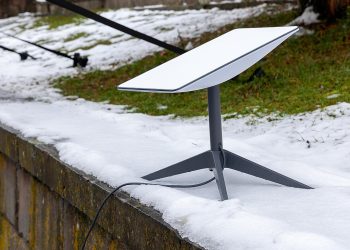
Engadget is explicit that the V5 is not a performance upgrade: the smaller, lighter, more efficient hardware comes at the cost of a slightly lower peak download speed. The kit ships with a Router Mini, a kickstand, a pipe adapter mount and a 15-metre cable, and is intended for fixed home internet rather than use while a vehicle is moving.
The V4 remains the terminal Engadget suggests most people start with, headlining the Standard 4 and Standard 4 X kits; it is a rectangular dish with no built-in motor, relying on software-assisted manual orientation and offering a 110-degree field of view. The difference between the two V4 bundles is the box, not the dish: Engadget says the Standard 4 ships with the smaller Router Mini, while the Standard 4 X includes the newer, faster Router 3.
Why it matters
The gap that counts is electrical. Engadget’s wattage figures work out, on our own arithmetic, at roughly 0.8 to 1.2kWh a day for a V5 running continuously against 1.8 to 2.4kWh for a V4 — about half the battery or solar capacity, for a dish that gives up at least 25Mbps of peak speed. That math suggests a V5 could stay on overnight on a small panel array or a modest lithium bank where a V4 could not, and that the 4lb weight difference puts a one-person roof or pole install within reach. Both are inferences from the published specifications; neither source tests runtime or installation.
The calculation inverts for anyone sharing a connection. A household streaming on several screens, or a small office, is paying the same $349 for less headroom if it takes a V5, and Engadget’s broader warning applies: the cheapest option is not always the best, and the most expensive can be overkill.
The portable and rugged options
The Mini is the obvious pick for taking a connection along, Engadget says, mainly because its Wi-Fi router is built in, so there is no second box to pack — more in our Starlink Mini coverage.
Above the home dishes sit two Performance models, on Engadget’s description:
- Performance (Gen 2), formerly the Flat High Performance Kit: 450Mbps down and 60Mbps up, developed for mobility, with a 140-degree field of view that holds a satellite lock through turns, a survivable wind speed of more than 174mph and a wedge mount tilted 8 degrees to shed water. Designed for permanent installation rather than quick setup.
- Performance (Gen 3): 475Mbps down and 75Mbps up on a 70W draw, aimed at remote and harsh sites including use in motion, rated from minus 40 to 140 degrees Fahrenheit, IP69K when its cables are installed, resistant to high-pressure cleaning and able to run on AC or DC power.
Both are quoted individually through Starlink’s business pages rather than carrying a list price.
How the dish fits into the network
Whichever terminal a customer buys, the path is the same. ShiftDelete.Net describes how a Starlink connection is put together: a request goes up from the dish to a satellite, down to a gateway, out to the server, and the response returns the same way.
Distance explains the difference from older satellite internet. Traditional services rely on single geostationary satellites about 35,786km above the equator, while Starlink satellites orbit at roughly 550km, ShiftDelete.Net says, and SpaceX is lowering many of them further. Citing Starlink’s technology page, it puts latency at around 25 milliseconds against 600ms or more for geostationary services, and residential downloads often around 100Mbps or more — well short of the peaks in the table above.
Each satellite carries three laser links to its neighbours, forming a mesh in space so data can hop between craft before coming down, which matters over oceans, polar regions and war zones with no nearby ground station, according to the same explainer.
Background
ShiftDelete.Net’s account of the constellation:
- Launches began in 2019; it is now the largest constellation in orbit, with more than 11,000 satellites.
- Most are second-generation V2 models.
- Customers include homes, RVs, boats, airlines and remote sites.
Capacity is meant to grow sharply. ShiftDelete.Net reports Elon Musk saying in November that V3 satellites launched on Starship should give Starlink about 100 times more bandwidth within two to three years — an unverified, SpaceX-sourced projection rather than a measured result, with no published independent testing behind it and a timeline that depends on how quickly Starship reaches a routine launch cadence. It follows the first V3 satellites joining the network.
SpaceX is also pushing into connectivity for ordinary smartphones, and ShiftDelete.Net says it is working on faster phone service, including a dedicated chip — the backdrop to SpaceX’s direct-to-cell plans. On where any of the dishes make sense, the outlet writes that Starlink is strongest where fiber, cable or fast 5G home internet is unavailable, and that in cities with good wired options “it is usually more expensive and not faster.”
Frequently Asked Questions
Do you need a residential subscription to use the Starlink Mini?
No. According to Engadget, the Starlink Mini is now widely available and does not require a residential subscription, which makes it an option for home use as well as travel. Engadget adds that it can be run from a compatible USB-C power source using Starlink’s optional USB-C to barrel jack cable.
How many people use Starlink?
SpaceX reported 13.6 million Starlink consumer subscribers as of 30 September 2026 in its third-quarter earnings release, plus hundreds of thousands of business customers, according to ShiftDelete.Net.
Can you use Starlink without a dish at all?
Only in a limited way, according to ShiftDelete.Net. It reports that Starlink’s direct-to-cell satellites act like cell towers in space, letting standard LTE phones send texts and use some data where mobile carriers have partnered with SpaceX, but full-speed broadband still requires the dish.
Does rain or busy periods affect Starlink speeds?
Yes. ShiftDelete.Net reports that performance can dip during busy evening hours in crowded areas, because speeds depend partly on how many people share the same satellite beams. It also says heavy rain or snow can cause short drops in service.